One App, Any Agent
Claude Code today, Codex tomorrow. Switch agents without touching a config file.
One app for Claude Code and your entire git workflow.
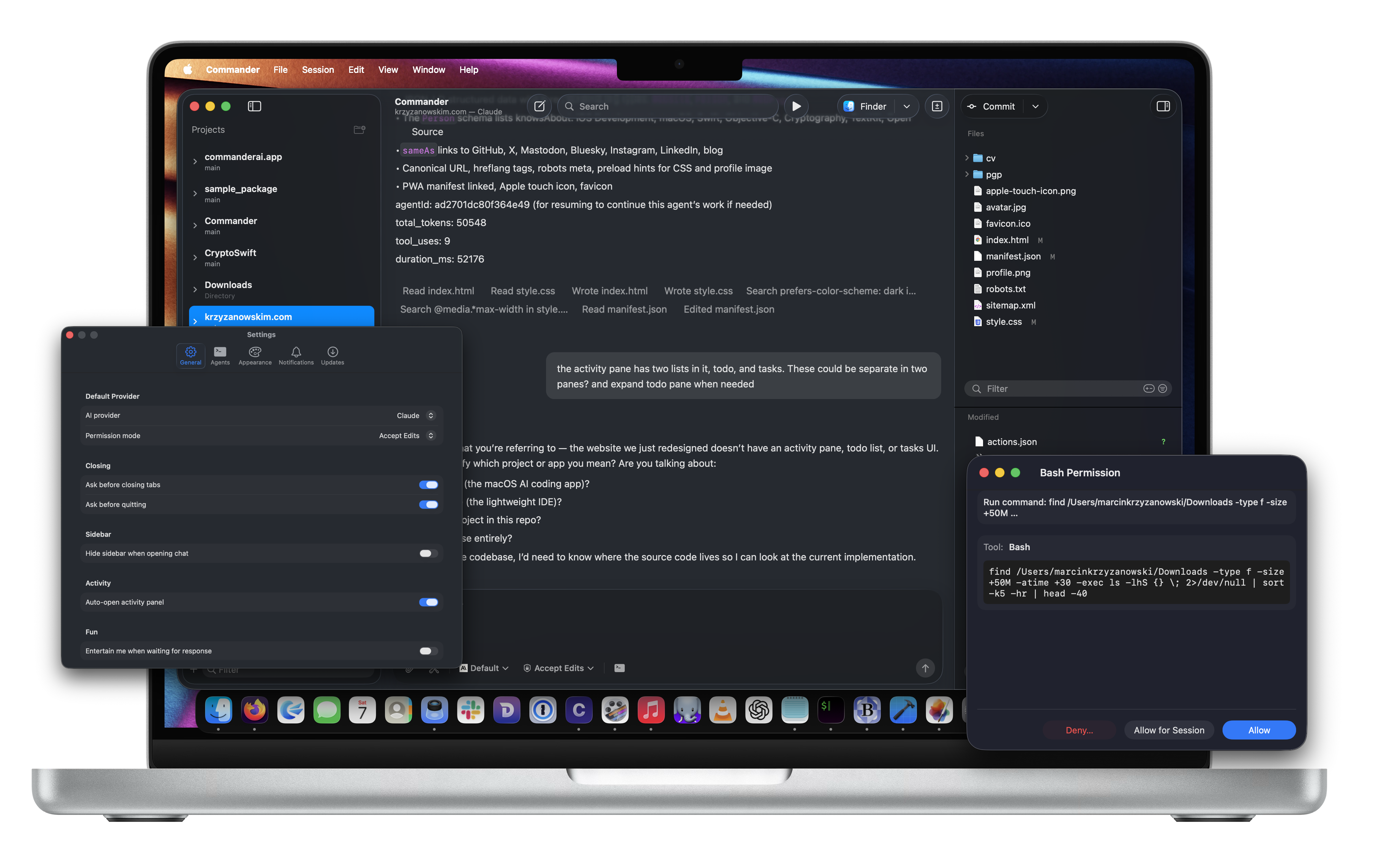
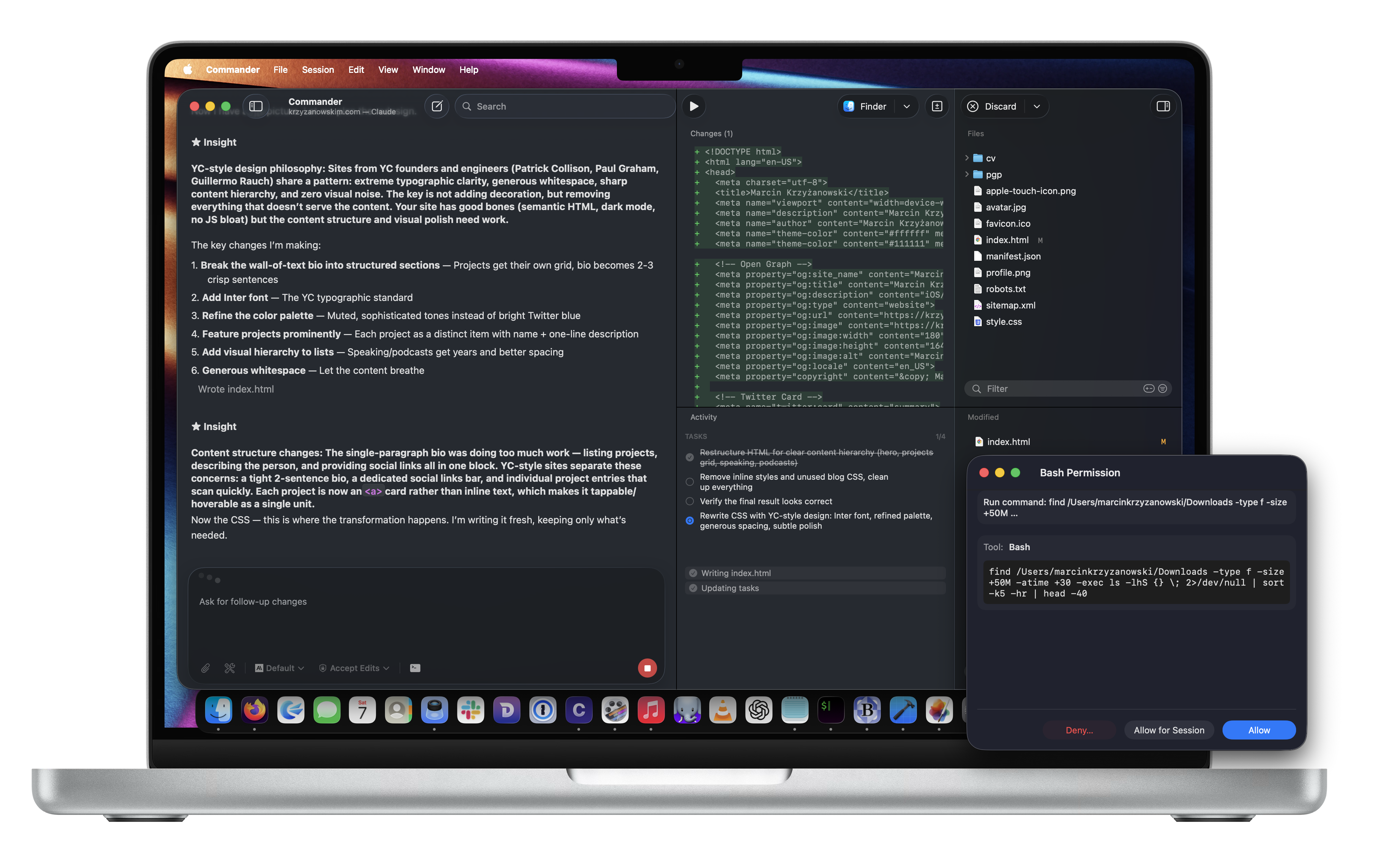
Prompt the agent. See the diff. Commit what's good. That's the whole workflow.
Requires a supported agent CLI installation
Open your project. Pick a branch or worktree. That’s your starting point.
Talk to Claude Code, Codex, or any supported agent. No new accounts, no setup dance.
See exactly what changed. Keep what’s good. Commit and move on.
Prompt, diff, commit. Here's what that actually looks like.
Work account, personal account, local model, cloud model — set them up once, assign to projects, switch instantly.
Agents generate code. Commander makes sure you actually review it before it lands.
Claude Code today, Codex tomorrow. Switch agents without touching a config file.
Every agent run is a reviewable unit. No more "wait, what did it change?"
Run three tasks in parallel on separate branches. No manual juggling, no stepping on your own work.
Hook up your own scripts to the toolbar. Run builds, linters, deploys — whatever your project needs.
Multiple chats in tabs. Detach any conversation into its own window. Arrange things however your brain works.
Close the app, reopen it, pick up right where you left off. Sessions survive relaunches.
Run agents on a remote Linux box over SSH. Review everything locally on your Mac.
Full VoiceOver support, clear hierarchy, keyboard-navigable. Not an afterthought.
30 MB. Native Swift. A magnitude less than any Electron app. Commander is the review loop your agents are missing.
This is for the work where "the agent wrote it" isn't an acceptable commit message.
Break the work into isolated runs. Review each chunk. Merge when it's actually ready.
The kind where one wrong rename breaks 40 files. See every change before it lands.
Try two approaches in separate worktrees. Compare. Ship the one that doesn't scare you.
Prompt, get a patch, read the diff. Commit only when you understand why it works.
Not locked to one provider. Bring whichever agent CLI you already use.
You already have tools. Here's why they don't quite work for agent-driven development.
git worktree add all dayReal developers, real workflows, real opinions.

I reached for Commander as soon as I heard about it. Having a native, focused workflow to iterate with AI just works for me in a way that busy editors with a dozen frames don’t.

I started using Commander since the first version and saw all the progress and how it evolved. Today it is a tool that is indispensable in my setup when I am creating some software or a feature.

I started using Commander out of curiosity. I love the fact that it gives me insight into the agent's thought process and gives me more control. The fact that the app is native is a killer, it's smooth as butter. Finally an AI app that doesn't turn my Mac into a heater.

I have been trying Commander recently since I want a native macOS experience with snappy performance and a clean, native UI. I also really like that it supports multiple AI providers, I can easily switch models without switching between multiple apps.
Three steps. No magic. No setup wizard.
Describe the feature, the bug, the refactor — in plain English. Commander sends it to your agent with full project context.
The agent writes code. You see exactly what changed, with syntax highlighting and inline diffs. Don't like something? Tell the agent to fix it.
Branch, commit, and push — all from inside Commander. No context-switching to a terminal or git GUI.
Commander is a local Mac app. Your keys stay in your CLI. Your code stays on your machine.
Commander never sees your API keys or passwords. Your agent CLI handles all authentication — Commander just talks to it.
Your repos never leave your machine via Commander. When you run an agent, the CLI may send context to its provider — that’s between you and the provider.
This site uses TelemetryDeck for anonymized analytics. No cookies, no PII, no tracking you across the web.
A Mac app that wraps your coding agents in a proper review loop. Prompt the agent, see what it changed, commit what's good. That's the core of it.
Yes, Commander is free to use. Just download it and go — no account required.
macOS 15.0 or later. It's a native Swift app, so it stays current with the latest macOS features.
Commander connects to the agent CLI you already have installed (Claude Code, Codex, etc.) and adds a review-first workflow on top. No extra accounts, no proxy layer.
A Mac running macOS 15.0+ and one supported agent CLI. That's it. Setup takes a few minutes.
You already have the agent CLI. Commander just makes it usable.
If your agent CLI works in the terminal, it works in Commander.
Branches, worktrees, and project state — all visible, all local.
VoiceOver, keyboard navigation, clear semantics. Built in from day one.
Commander is built by Marcin Krzyzanowski, a Swift developer who got tired of juggling terminals, git GUIs, and agent windows every time he wanted to ship something. He also makes Notepad.exe and DoctorMarvin.ai.
Free to use. Native Mac app. No account required.